Outbound · Contracts
Fill your contracts from the deal.
Upload your agreement as a PDF and place fields on it: text, dates, signatures, checkboxes, and metric fields mapped to anything Pathway computes. Each book produces its own filled contract.
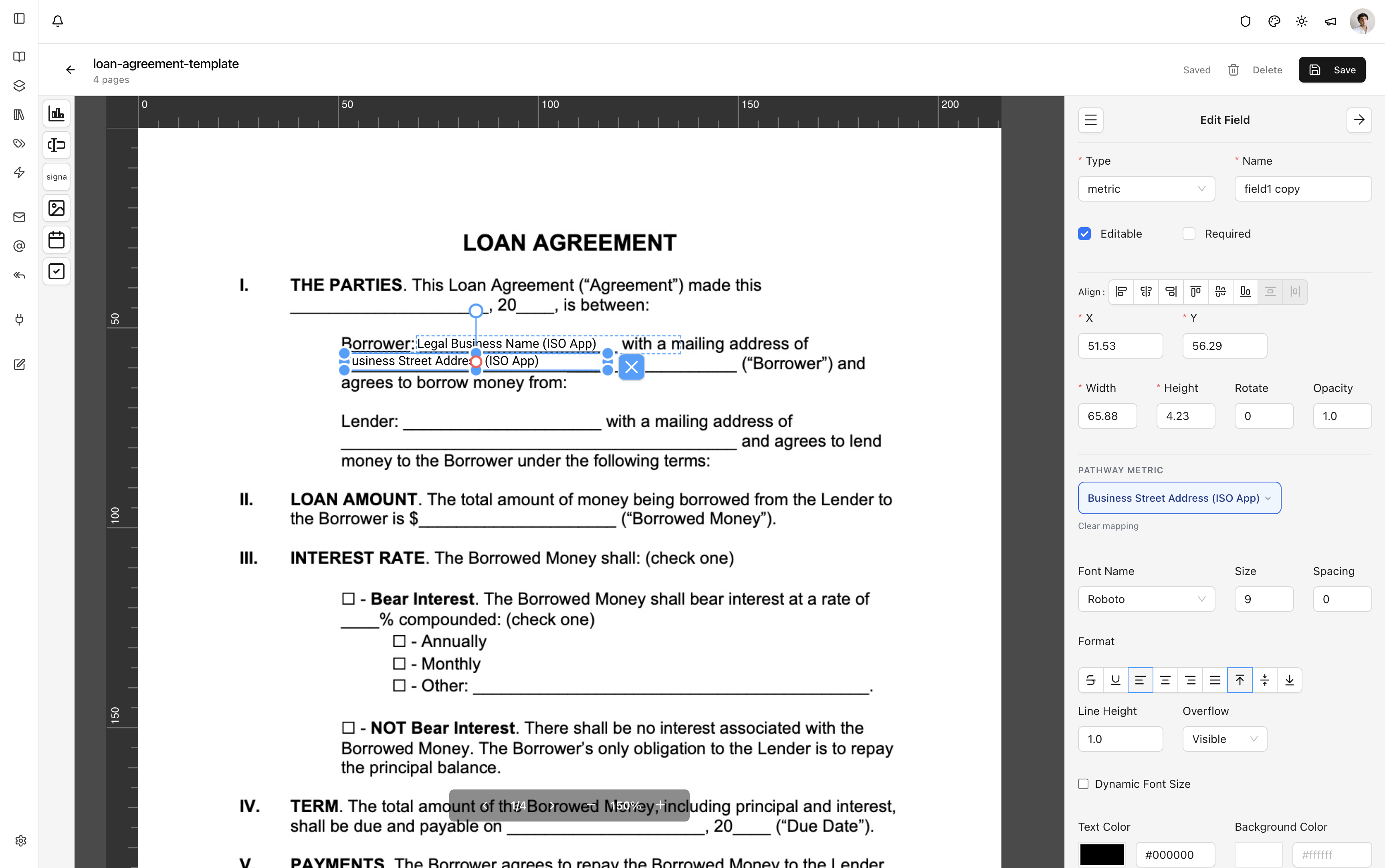
Design on your own PDF
Upload a funding contract and open it in the designer. Drag fields onto any page: text, signature, image, date, checkbox, or metric. The designer saves as you work.
Metric fields
A metric field maps a spot on the page to a Pathway value through the same picker screening uses: legal name, EIN, owner details, and addresses from the application, revenue and balances from the statements, and the primary offer’s terms. Values are formatted the same way screening formats them.
One contract per deal
Every book has a Contracts tab with your templates. Choose one and Pathway generates the filled PDF for that deal to preview and download. A book with only a loan application can fill a contract.